Are you wondering how to truly get the most out of GitHub Copilot? This comprehensive guide dives deep into effective copilot prompting strategies. We will explore various techniques to enhance your AI coding experience, from crafting clear instructions to understanding context. Discover how to ask the right questions and interpret Copilot's suggestions for faster development workflows. This resource offers actionable insights for both new users and experienced developers looking to optimize their interactions with AI assistants. Learn to leverage Copilot's potential to its fullest, transforming your coding process. We cover everything from setting up your environment to advanced prompt engineering. You'll find practical examples and real-world scenarios to help you master this powerful tool. This is your go-to source for navigating the exciting world of AI-assisted programming. You'll gain confidence and efficiency in your daily coding tasks. It's time to elevate your development game significantly.
Hey everyone, I've seen a lot of questions pop up lately about how to really get the most out of GitHub Copilot. It's an amazing tool, but honestly, knowing how to prompt it effectively makes all the difference. You know, people often ask, "How do I make Copilot actually write what I want?" or "Why isn't Copilot suggesting the right code for me?" Well, I've spent a fair bit of time experimenting, and I think I've cracked some of the secrets to making it sing. This guide is all about helping you understand the best ways to communicate with your AI coding partner. We're going to dive deep into making your prompts clear and concise, so Copilot can deliver exactly what you need. It’s truly a game-changer when you master this skill.
Understanding Copilot's Brain: It's All About Context
One of the biggest lessons I've learned is that Copilot isn't just a magic code generator; it's a context-aware assistant. It really tries to understand what you're doing based on your open files and comments. So, when you're thinking about your next prompt, remember that providing good context is absolutely crucial. Think of it like giving directions to a friend; the more detail you provide about your starting point, the easier it is for them to help you get where you're going. This foundational understanding can seriously elevate your Copilot experience. Getting this right is often the initial question many developers have.
Crafting Clear and Concise Prompts
This is where the rubber meets the road. Your prompts need to be crystal clear. Vague instructions often lead to vague or incorrect suggestions, which can be frustrating. I've found that specifying the exact function, variable names, and expected output helps immensely. Don't be afraid to be explicit about what you want it to achieve. For instance, instead of "write a loop," try "write a Python for loop to iterate over a list called 'items' and print each item." This detailed instruction gives Copilot a much better chance of providing a useful answer quickly.
- Be specific about the programming language and framework you're using.
- Define inputs and expected outputs for the code snippet.
- Use comments to set the stage before writing any code.
- Break down complex tasks into smaller, manageable steps.
The Power of Comments: Guiding Your AI
Honestly, comments are your best friends when prompting Copilot. Before you even start typing code, a well-written comment can act as a detailed brief for your AI assistant. It allows you to explain your intent, the purpose of the function, or the logic you're trying to implement. I've tried this myself, and a good comment often results in Copilot generating almost perfect code on the first try. It’s like giving it a mini design document to work from. This guide truly emphasizes the importance of these seemingly small details.
- Start with a high-level comment for the entire file or class.
- Add function-level comments describing parameters and return types.
- Use comments to explain complex logic blocks before implementation.
Iterative Prompting: Refining Your Results
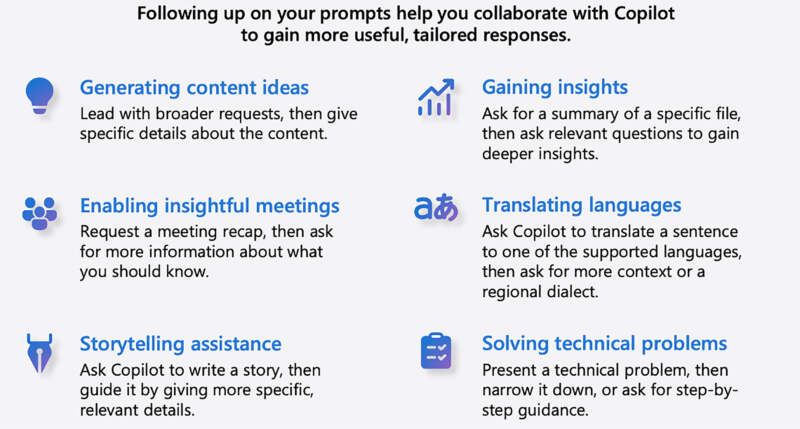
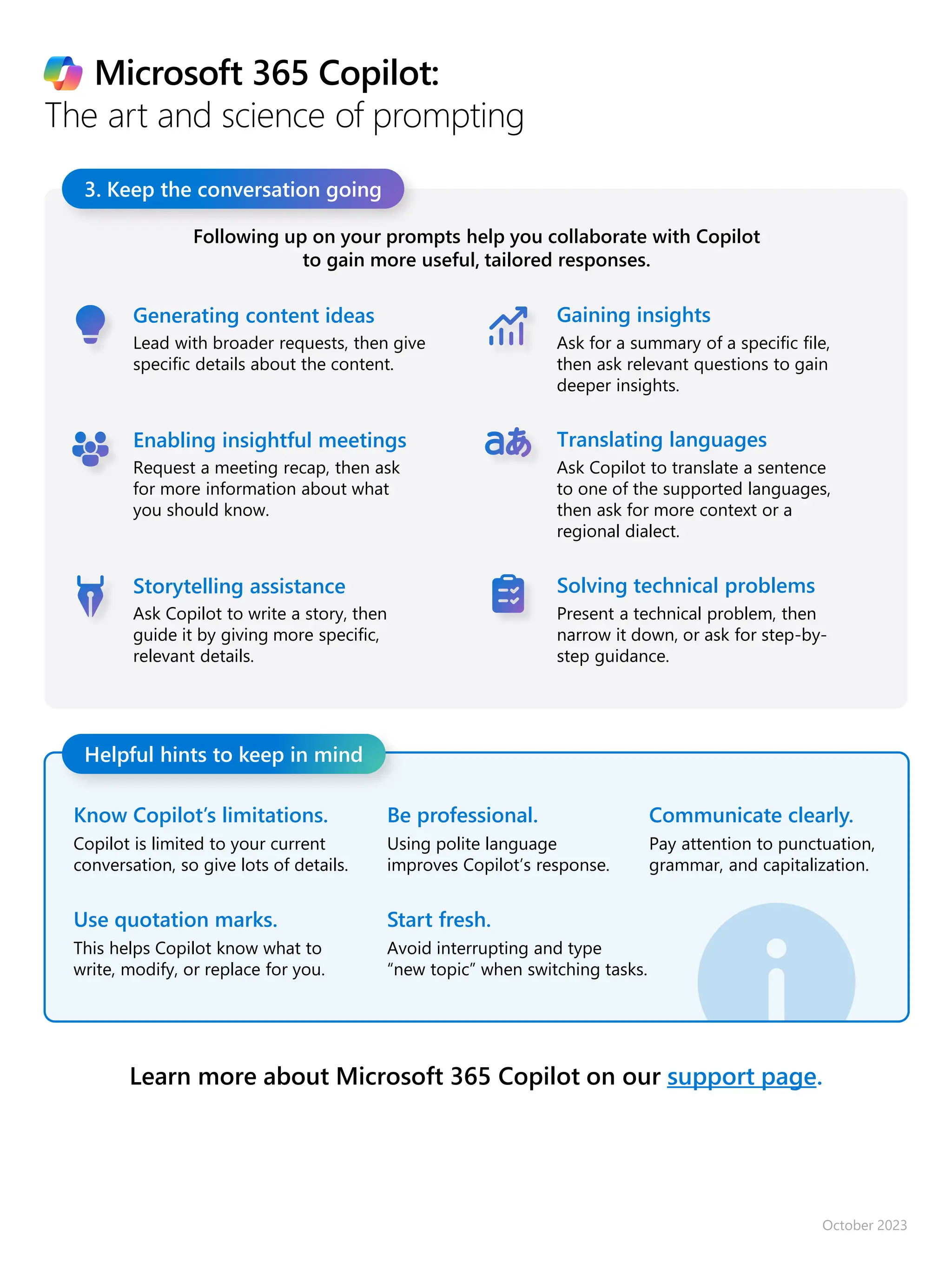
Sometimes, Copilot won't get it perfectly on the first try, and that's totally okay. The key is to engage in iterative prompting. Think of it as a conversation where you provide feedback and refine your requests. If the initial suggestion isn't quite right, you can modify your comment, add more context, or even provide a small example. Copilot learns from your interactions within the current session, so don't give up after one attempt. This process often helps to resolve tricky coding problems efficiently.
Providing Examples and Desired Patterns
When you need a specific pattern or style of code, providing an example directly in your editor can be incredibly powerful. If you want a particular way of handling errors or structuring a class, just start typing a small snippet that demonstrates your desired style. Copilot often picks up on these patterns and applies them to its suggestions. This is super helpful for maintaining consistency across your codebase. It’s like showing it a blueprint instead of just describing it.
Troubleshooting Common Prompting Issues
I know it can be frustrating when Copilot isn't giving you what you want. Often, the issue isn't with Copilot itself, but with how we're asking the question. Check your current file for conflicting code or unclear variable names. Sometimes, simply restarting your IDE or updating your Copilot extension can resolve minor glitches. Make sure your context is clean and focused on the task at hand. Honestly, a quick review of your prompt clarity often solved the problem for me.
- Is your prompt too broad? Try narrowing its scope.
- Is there enough relevant code in the current file for context?
- Are you asking for something beyond its current capabilities?
- Have you considered a related search to see how others prompt similar tasks?
Advanced Prompt Engineering Techniques
Once you've got the basics down, you can start exploring more advanced ways to prompt Copilot. This includes using specific keywords within your comments to trigger certain behaviors. For instance, sometimes stating "unit test for..." or "refactor this function to..." can guide Copilot more effectively. Understanding these nuances helps you become a true Copilot power user. It truly feels like unlocking new levels of productivity.
Leveraging Test-Driven Development (TDD) with Copilot
This is a fantastic strategy. If you write your tests first, describing what your code should do, Copilot can often generate the implementation directly from those test descriptions. It's a natural fit for TDD workflows. You essentially use your test case comments as very detailed prompts, guiding Copilot to write the production code that passes those tests. This method ensures your code not only works but also meets your specified requirements. It's a brilliant way to make Copilot an integral part of your development process.
Refactoring and Debugging with AI Assistance
Copilot isn't just for new code; it can also assist with refactoring and debugging. If you have a block of messy code, you can comment above it with "Refactor this function to be more readable" or "Optimize this loop for performance." It can even suggest fixes for common errors if you highlight the problematic section and ask for a guide to debug it. I've personally seen it simplify complex logic quite effectively. It’s like having an extra pair of eyes on your code.
Mastering Prompt Granularity: Big Picture to Fine Detail
When you're working with Copilot, understanding how much detail to provide in your prompts is a critical skill. Sometimes you need to give it a high-level overview of an entire file or component. Other times, you'll need to zoom in and give extremely precise instructions for a single line of code. It's about finding that sweet spot for each specific task. This level of prompt granularity is a nuanced aspect of getting the best out of your AI coding assistant. It's truly an art form that improves with practice.
High-Level Architectural Guidance
For larger tasks, start with a broad prompt at the top of a new file. Describe the module's purpose, its main classes, and how they should interact. For example, "Create a Python file for a user authentication service with functions for registration, login, and password reset." This gives Copilot a foundational understanding before it dives into specific implementations. It sets the stage for a well-structured and cohesive output. Providing a good overview can actually resolve many structural issues upfront.
Line-by-Line Code Completion and Refinement
Conversely, when you're in the middle of writing a function, you might only need a small suggestion. Perhaps you need to complete a complex lambda function or suggest a specific data structure. In these cases, your prompt can be as simple as an incomplete line of code or a very short, precise comment. It’s about leveraging its ability to predict the next logical step. Knowing when to be broad and when to be laser-focused is key to efficient prompting. This often involves a rapid question and answer loop.
Ethical Considerations and Responsible AI Use
While Copilot is a powerful tool, it's also important to use it responsibly and ethically. AI models are trained on vast amounts of data, and sometimes that data might contain biases or introduce security vulnerabilities. It's always your responsibility as the developer to review and understand the code Copilot suggests. Don't just blindly accept suggestions. Think critically about what it provides and ensure it meets your project's standards. This responsible approach is a crucial part of any comprehensive guide to AI coding tools.
Vetting Code for Security and Performance
Never assume Copilot's code is perfectly secure or optimized without review. Always manually check for potential security flaws, inefficient algorithms, or best practice violations. Treat Copilot as a highly productive assistant, not a replacement for your expertise. Integrating static analysis tools and code reviews into your workflow is more important than ever. This diligence helps prevent future headaches and ensures code quality. It’s an essential step that often solved potential issues early.
Avoiding Bias and Promoting Inclusive Code
AI models can inadvertently perpetuate biases present in their training data. Be mindful of this when Copilot suggests code, especially in sensitive areas like data processing or user interfaces. Actively strive to write inclusive and fair code. If Copilot suggests something that seems biased or exclusionary, modify it. Your oversight is vital in creating equitable and robust software systems. This is a critical aspect of being a responsible developer today.
Integrating Copilot into Your Daily Workflow
For me, the real magic of Copilot comes when it becomes seamlessly integrated into my daily routine. It's not just a tool you open occasionally; it's a constant companion. Setting up your environment correctly and developing muscle memory for how and when to prompt it makes a massive difference. You'll find yourself reaching for comments and partial code more naturally. This truly transforms how you approach coding tasks, making everything feel more fluid.
Setting Up Your IDE for Optimal Copilot Experience
First things first: ensure your IDE (like VS Code) is properly configured. This means having the Copilot extension installed and updated. Sometimes, adjusting settings for tab stops, auto-completion, or even font can impact how you perceive and interact with its suggestions. A smooth, responsive environment is key to a productive AI-assisted experience. A quick related search for "Copilot VS Code settings" can reveal some helpful tweaks.
- Keep your Copilot extension updated to leverage the latest features.
- Ensure your network connection is stable for real-time suggestions.
- Experiment with different file types and languages to see its capabilities.
Developing Prompting Habits and Best Practices
Consistency is key. Develop habits like always starting a new function with a descriptive comment. Get used to writing a few lines of code to provide a strong contextual seed. Practice breaking down complex problems into smaller, promptable chunks. Over time, you’ll intuit what kinds of prompts yield the best results. It’s a skill that develops with continuous use and intentional practice. This persistent application of the guide principles will lead to significant improvements.
Practical Prompting Scenarios: Real-World Examples
Let’s walk through some common scenarios where excellent prompting can truly shine. These examples illustrate how to apply the principles we've discussed to everyday coding challenges. It's often through practical application that you truly grasp the power of Copilot. Seeing it in action often clarifies many of the theoretical points. This section aims to provide concrete actionable strategies.
Generating a Complex Regular Expression
Imagine you need a regular expression to validate an email address. Instead of just typing "regex for email," which might give you a very generic pattern, provide more context. A better prompt might be:
// JavaScript regex to validate an email address, allowing subdomains and common TLDsFollowed by `const emailRegex = /`. You'll find Copilot will often generate a much more robust and accurate regex pattern. It’s about being specific about the desired output and constraints. This targeted question helps generate a precise answer.
Creating a Database Query or ORM Call
When interacting with databases, specificity is paramount. If you're using an ORM like SQLAlchemy or Entity Framework, don't just ask for a "query users." Instead, try something like:
// Python, SQLAlchemy: Get all active users whose last login was within the last 30 days and order by registration dateThen start your ORM call, e.g., `session.query(User).filter(...`. Copilot will leverage your comment and existing code to construct a sophisticated query. This is a common situation where a detailed guide can be very beneficial.
Writing Unit Tests for Existing Functions
As mentioned before, TDD works wonders. For an existing function, let's say `calculate_discount(price, percentage)`, place your cursor below it and write:
// Python, unittest: Write unit tests for the calculate_discount functionThen start with `import unittest` or `class TestDiscount(unittest.TestCase):`. Copilot often generates test cases for various scenarios, including edge cases. It's an incredible time-saver for ensuring code quality. This approach often solved the tedious task of test writing efficiently.
Scaffolding a New Component or Class
Need a new React component or a C# class? Start a new file and provide a descriptive comment at the top. For a React component:
// React Functional Component: A 'UserProfile' component that displays user's name, email, and a profile picture. It should accept 'user' prop and use useState for local state. Import necessary hooks.Then start with `import React, { useState } from 'react';`. Copilot will scaffold the basic structure, including imports and initial state. This is an effective way to kickstart development. A clear initial question can lead to a well-structured starting point.
Overcoming Copilot's Limitations and What to Expect
It's important to remember that Copilot is an AI, and it has limitations. It's not perfect, and it won't always give you the ideal solution. Understanding these boundaries helps you manage your expectations and use the tool more effectively. It’s part of a holistic understanding of AI assistance. Knowing when to rely on it and when to take over is crucial for overall productivity.
Dealing with Stale or Incorrect Suggestions
Because Copilot is trained on vast amounts of public code, sometimes its suggestions can be outdated or incorrect. This is especially true for rapidly evolving libraries or frameworks. Always verify the code, especially for critical sections. If you notice a pattern of incorrect suggestions, try rephrasing your prompt or providing a small, correct example of the desired syntax. A quick related search online for current best practices can help clarify things.
Handling Complex Algorithmic Challenges
For truly novel or complex algorithmic problems, Copilot might struggle. It excels at generating boilerplate, common patterns, and repetitive code. However, for highly original or research-heavy algorithms, you'll likely need to guide it very heavily or write most of it yourself. Use it as a helper for the surrounding code, rather than expecting it to invent groundbreaking solutions. It’s a tool for augmentation, not pure invention. It can help resolve parts of the problem, but not the whole.
Ethical Considerations and Intellectual Property
This is a big one. While Microsoft states Copilot generates novel code, the fact it's trained on public repositories raises questions about intellectual property and attribution. Be aware of your company's policies regarding AI-generated code. Always review the code to ensure it doesn't inadvertently introduce licensed snippets. It's a complex area, and staying informed is part of responsible AI development. This forms a significant question in the developer community.
Wrapping things up, the journey to mastering Copilot prompting is truly an evolving one. The more you use it with intention, the better you'll become at leveraging its incredible capabilities. It's less about magic and more about clear communication and iterative refinement. I'm telling you, once you dial in your prompting game, you'll see a noticeable boost in your coding speed and quality. What are your go-to prompting tricks that you've discovered? Let’s keep this conversation going and help each other out!
Mastering Copilot prompting transforms your coding workflow by teaching effective instruction crafting. It emphasizes understanding context for optimal AI suggestions. This guide covers setting up your environment, advanced prompt engineering, and interpreting AI output. You'll learn practical techniques, discover real-world examples, and gain confidence in AI-assisted development. Boost your efficiency and elevate your programming skills with expert prompting strategies.
How To Create A Copilot Prompt In 5 Easy Steps Savvy Technical Solutions Understand Copilot Prompt Gallery Microsoft Learn Copilot Prompt Gallery Diagram Copilot Prompting Toolkit All Resources Pdf Web Copilot Prompting Toolkit All Resources Pdf 3 638
Microsoft Copilot Prompting Cheatsheet Team Copilot Microsoft Copilot Prompting Cheatsheet 1280x1810 Einstein Copilot In 2026 10 Admin Ready Use Cases Setup Guides Einstein Copilot In 2026 10 AdminReady Use Cases Setup Guides 1 1 3 AI Prompting Skills Generative AI Guidebook For Teaching Image1 Prompting Like A Pro Do S And Dont S With Copilot ESPC Conference 2026
Copilot For Microsoft 365 Overview Copilot Prompting Dos Donts The Evolution Of Copilot From Code To AI Assistant Blog Download Your Guide To Copilot Prompts 1536x807 Microsoft Copilot For Students Microsoft Learn Prompt Guidelines Excel PivotTable Guide For 2026 Prompts Limits Examples Geeky Gadgets Power Query Clean Data Merged Cells
A Complete Guide To Copilot Prompts Central Technology Copilot3 768x768 The Copilot For Microsoft 365 Prompt Guide US Cloud The Copilot For Microsoft 365 Prompt Guide 800x450 Microsoft Copilot Cheat Sheet V4 PDF Microsoft Excel Computing 1729447841Use Microsoft Copilot For Event Agendas And Email Drafts Geeky Gadgets Microsoft Copilot Login M365
Copilot For Microsoft 365 Overview Copilot Prompting Guide Practical Prompting Techniques For Executives Using Microsoft Copilot Prompt Anatomy Schema 1024x576 Microsoft 365 Copilot Prompting Guide 027324004 1 768x994 Your Guide To Copilot Prompts Blog Quisitive Blog Feature Image Copilot Prompt Guide 768x512
Meet Activity Copilot Studio S Unsung Hero Mastering Microsoft Copilot Best Practices For Prompt Engineering Unleash Creativity With Microsoft Copilot Prompts2 800x429 The One Copilot Prompt That Saved My 60 Slide Pitch Deck Copilot Prompt StructureThe 7 Deadly PowerPoint Copilot Mistakes And How To Fix Them 2026 Guide Copilot Vague Vs Specific Prompts 2.webp
Copilot Prompt Gallery Your One Stop Resource For Mastering Prompts In 1536x923 Microsoft Copilot With Excel A Complete Guide 2026 Free Online 7068577 76c9 2 2048x1152 14 Free GitHub Copilot For VS Code In 2025 ImageOptimiser Son CV Gr Ce ChatGPT Copilot Works Prompt Copilot Avril2024
Microsoft Copilot Prompting Techniques Context Anchoring Document C5719c Microsoft User Copilot Training Slide Deck PPTX Microsoft Copilot Quick Guide E94b845f Thumbnail Advanced Prompting With GitHub Copilot Student Affairs Free Training Advanced Prompting With GitHub Copilot Copilot Prompting Toolkit All Resources Pdf Copilot Prompting Toolkit All Resources Pdf 2 2048
Understand Copilot Prompt Gallery Microsoft Learn Prompt Gallery Overview Prompt Guide For Copilot For Microsoft 365 Prompting Ingredients 768x521 What Are Copilot Prompts And How To Write Them Microsoft YouTube The 7 Deadly PowerPoint Copilot Mistakes And How To Fix Them 2026 Guide Powerpoint Copilot Power Pack Cta.webp